博文

How to build a ozone destructor

The below content of the blog is from google doc and keeps updating when I have more progress. If you want to click the link in this blog, please right-click the link and select open in new tab (window).  

How to Build a Ozone Disinfection Box to Kill Virus Saftly

The below content of the blog is from google doc and keeps updating when I have more progress. If you want to click the link in this blog, please right-click the link and select open in new tab (window).  

AWG Wire Size table

AWG Wire Sizes (see chart below) AWG : In the American Wire Gauge (AWG) system, wire size diameters can be calculated by applying the formula D(AWG)=.005·92((36-AWG)/39) inch. For the 00, 000, 0000 etc. gauges you use -1, -2, -3, which makes more sense mathematically than "double nought." This means that in American wire gage every 6 gauge decrease gives a doubling of the wire diameter, and every 3 gauge decrease doubles the wire cross sectional area. Similar to dB in signal and power levels. An approximate but accurate enough form of this formula contributed by Mario Rodriguez is D = .460 * (57/64)(awg +3) or D = .460 * (0.890625)(awg +3). Metric Wire Gauges (see table below) Metric Gauge :  In the Metric Gauge scale, the gauge is 10 times the diameter in millimeters, so a 50 gauge metric wire would be 5 mm in diameter. Note that in AWG the diameter goes up as the gauge goes down, but for metric gauges it is the opposite. Probably because of this confusion, most of the t...

How to build a cheap J-Link lite debug tool for Infineon XMC CPu

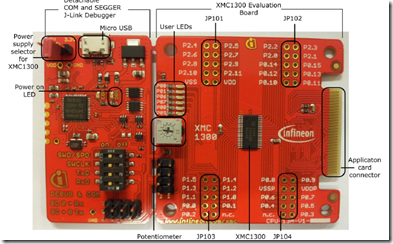
Here I share a cheap way to build a J-Link Lite debug tool for infineon from a boot kit from Infineon which cost 24 Dollars on Mouser or Digikey.

Induction heater

How to Program XMC Mcu with XMCFlasher

图片
1. Download XMCFlasher from website of Infineon .  Or use this link XMCFlasher ; 2. Install Oracle Java8 JRE . If it is not yet installed in your system. 3. Install the latest Segger JLink software . 4. Extract the folder XMC™ Flasher to the preferred location. Double click on XMCFlasher.jar, Click on Connect and select which mcu you are going to program. If some error happen. Maybe it because the BMI set is not correct. You can set the BMI mode by click on the BMI on menu. Click Select File button to select which program is going to program. Usually the file is locate in the \Debug or \Release subfolder under your project folder depends on you set of project. After that, click Program button, the mcu will programmed. If you have several board to program, click Connect button when you change a board and click Program Button. I found in some computer, when you run XMCFlasher.jar. It will show an error. Even I reinstall Java, the error is still there. But Wh...

Windows 10 CHM Help Files Showing Up Blank

图片
Windows Help CHM viewer Only show up the table of contents, but the content pane was blank. The reason is that Windows 10 will block the files download from internet automatically.  If you unblock the file, then the content pane will show up correctly. Find the .chm file location, right click, and go If you have a lot files do not showing up correctly. You can use PowerShell to solve the problem. Locate the folder contains all the help files. Right click the blank place of the fold with shift key. Then select power shell. In Power Shell run this command: Get-ChildItem  -Recurse | Get-Item -Stream Zone.Identifier -ErrorAction Ignore | Select-Object -ExpandProperty FileName | Get-Item | Unblock-File

How to cover vias with solder mask in Eagle

图片
Solder mask Layer in Eagle is defined as 29 tstop for top layer and 30 bstop for bottom layer. So you can check if you solder mask is as you required by display these two layers. The vias in Eagle are not cover with solder mask by default. You can change the default setting by changing the Design rules. Run Command: DRC; You will see the DRC check dialog. Select Masks tab. You can see the Limit option. The default value is 0 mm. Thus for all the vias it will not cover by solder mask. You change it to the value is bigger than the size of the via you want to cover with solder mask. Then you can run the command: display tstop or display bstop to check if it work as you want.

Infineon XMC Microprocessor Debug-BMI set

图片
When I trying to debug the circuit board which designed for digital power using XMC1302T38-0032. I meet such error. “ Connecting to target...ERROR: Could not connect to target. Target connection failed. GDBServer will be closed...Restoring target state and closing J-Link connection... ” Finically I found the problem is because BMI (Boot Mode Index) is not right for debug. When XMC1000 device is just out of the factory, its default BMI value is ASC Bootstrap Load Mode. So I change the BMI to User Mode (debug) SWD0 (SWDIO=P0.14, SWDCLK=P0.15). The I can sue DAVE4 to debug the boards. I use the XMC42_OBD build in on XMC1000 boot kit to debug my board. The method to change BMI is. 1) click the tool icon as below.   2) On the pop up window, you can get or set BMI as below. 3) Set the BMI So I suggest before design your own board, try to under stand the BMI options first. Thus, you could design a board could use.

How to change the drill size of all via on boards in Eagle

Use command:  display none; display via; group all; change drill 0.5mm (C>0 0); display last;

Unroute a complete PCB in Eagle

图片
To unroute (or ripup) a complete board, first activate the ripup tool by clicking the ripup icon, or run command ripup; Then, click the ‘go’ button in the top of the Eagle window to ripup all signals:

Resonant Flyback switch controllers

ICE5QSAG: Infineon latest 5 th generation quasi-resonant flyback PWM controller offers high performance and comprehensive suite of protection to increase system robustness. VCC: 10.4~24V Freq: 20k~ VCC Turn-on Threshold Voltage: 16V VCC Turn-off Threshold Voltage :10V Maximum on time in normal operation: 35us Maximumoff time in normal operation :42.5us

Analog comparators with different layout of SOT23-5

图片
TL331 : 1-In-, 2-V-, 3 In+, 4-Out, 5-VCC;  () LMV331 : 1-In+, 2-GND, 3-In-, 4-Out, 5 Vcc+ MIC722 : 1-Out, 2-V+, 3-IN+, 4-IN-, 5- V- TS881 : 1-Out, 2-V-, 3-IN+, 4-IN-, 5-V+

How to change fonts in Eagle

Use command:        display torig borig;   # Display the top and bottom origins     group all;             # Group everything     smash (C>0 0);         # Smash everything in the group     display none tname bname tval bval; # OPTIONAL: limit changes the names and values     group all;             # Group everything including smashed texts.     change font vector (C>0 0); # Change the font to a vector font     change size 50mil (C>0 0); # Change the font size     change ratio 15 (C>0 0); # Change the width:height ratio     display last;

High side current sensor circuit with protection

图片
Recently, I am trying to design a high side current sensor circuit in my power system. But I am suffering occasionally broken of the sensor chip. And I realize that the proper protection of this circuit is quite important. Here is a protection circuit came from Ti Design. The original file could be found here .

How to make a signal source in Multisim Blue

图片
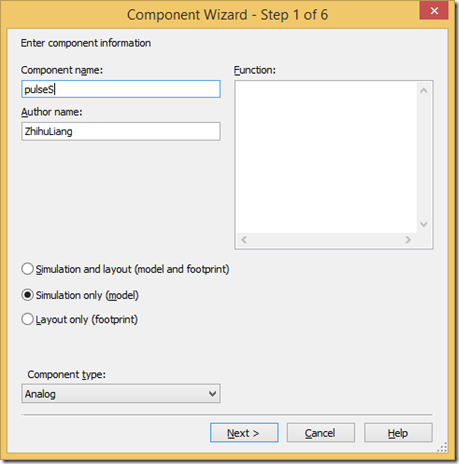
When I use Multisim Blue mouser version to simulation a circuit. I found that this version do not have a pulse source, so it is difficult to generate a pulse with delay. I found a method that could use pulse by make a component by component wizard. The steps as blew. 1) Select from menu. Tools->Component Wizard Fill the Component name as you like. Select Simulation only. Then click Button “next” Set the number of pins to 2. Then click Button “next” Click Button “copy from DB” Select Clock voltage. Then click Button “OK” Click Button “Next” click Button “Next” Fill Model Name “pulseS” and Fill Model data with: .SUBCKT pulseS CR1 CR2 PARAMS: V1=0 V2=15 TD=0NS TR=10NS TF=10NS PW=20US PER=100US vV1 CR1 CR2 PULSE({V1} {V2} {TD} {TR} {TF} {PW} {PER}) .ENDS Then click Button “Next” Then click Button “Finish”. You can put the component on where you want. When you want to change the parameter, you can right click the components and select “properties”, then click Ta...

NON Volatile Digital Potentiometers

A digital potentiometer (also called a resistive digital-to-analog converter or informally a digipot ) is a digitally-controlled electronic component that mimics the analog functions of a potentiometer . It is often used for trimming and scaling analog signals by microcontrollers . It Can be divided to Volatile version and Non Volatile version. Volatile Version will reset when lost power. The non-volatile version can keep the set when lost power. Manufacturer Part #: Optional Digital Interface Package Price for 100($) Voltage MCP4024T-103E/OT MCP402X (2.1k, 5k, 10k, 50k) Serial (2-Wire, CS and U/D) SOT-23-5 60 3.3 V, 5 V DS4301U-200+ 200k Up/Down USOP-8 67 2.4 V to 5.5 V MCP4141-103E/MS MCP414X/MCP416X MCP424X/MCP426X Serial (4-Wire, SPI) MSOP-8 61 2.5 V, 3.3 V, 5 V MCP4541-103E/MS MCP454X/MCP456X MCP464X/MCP466X Serial (2-Wire, I2C) MSOP-8 61 2.5 V, 3.3 V, 5 V CAT5140ZI-50-GT3 50k, 100k Serial (...

Small footprint Low voltage low resistance N-Channel MOSFET on Mouser

BSS214N H6327 (20V, 1.5A,  106mOhms) (SOT23-3),  Infineon Technologies ,  ($56 for 1000Pcs ) BSS806N H6327 (20V, 2.3A,  41mOhms) (SOT23-3),  Infineon Technologies ,  ($78 for 1000Pcs ) DMG2302UK-7 (20V, 2.8A,  61mOhms) (SOT23-3), Diodes Incorporated ,  ($72 for 1000Pcs ) DMN2041L- 7 (20V, 6.4A,  20mOhms) (SOT23-3),  Diodes Incorporated ,  ($90 for 1000Pcs ) NTR3C21NZT1G (20V, 3.6A,  18mOhms) (SOT23-3), ON Semiconductor ,  ($108 for 1000Pcs ) FDC637BNZ (20V, 6.2A,  24mOhms) (SSOT-6),  ON Semiconductor ,  ($114 for 1000Pcs )

How generate component placement file in PADs Layout to tell contract manufacturer which component goes where?

图片
The PCBA manufacture needs a file to tell them where the components should place in SMT machine. You can follow step list below to generate that kinds file in PADS Layout. 1) Set the design units to metric.     Select options in Tools menu.      2) Set the origin to the Bottom Left corner, If there is something is out of the board, you can set the origin to let all object in the board is positive coordinate. Or there may be something wrong when you generate manufacture file use cam. 3) Generate the components place file using CAM PLUS Set as shown in the picture and click Run button. It will generate all the components on the top layer. If you have components on the bottom layer, please run again and change the side to the bottom. The extension name of the generated file is .318. In fact, these files are text files. You can check those file by a text file editor. The file contents are like that.

The resistance value of resistors on market

For 5% resistor (Ohms) 1.0    5.6    33    160    820    3.9K    20K    100K    510K    2.7M 1.1    6.2    36    180    910    4.3K    22K    110K    560K    3M 1.2    6.8    39    200    1K    4.7K    24K    120K    620K    3.3M 1.3    7.5    43    220    1.1K    5.1K    27K    130K    680K    3.6M 1.5    8.2    47    240    1.2K    5.6K    30K    150K    750K    3.9M 1.6    9.1    51    270    1.3K    6.2K    33K    160K    820K    4.3M 1.8    10    56    300    1.5K    6.6K    36K    180K    910K    4.7M 2.0    11    62    330    1.6K    7.5K    39K    200K    1M    5.1M 2.2    12    68    360    1.8K    8.2K    43K    220K    1.1M    5.6M 2.4    13    75    390    2K    9.1K    47K    240K    1.2M    6.2M 2.7    15    82    430    2.2K    10K    51K    270K    1.3M    6.8M 3.0    16    91    470    2.4K    11K    56K    300K    1.5M    7.5M 3.3    18    100    510  ...